Best Educational Apps for Kids in India: A Parent’s Guide
Educational apps can help children practise reading, maths, vocabulary and problem-solving through interactive activities. For parents in India, the challenge is choosing an app that matches a child’s age, learning needs and language preferences without turning screen time into an endless stream of games.
The best educational apps for kids in India combine purposeful activities with age-appropriate content, clear learning goals and suitable parental controls. Some focus on foundational literacy, while others offer maths practice, digital storybooks or broader learning activities.
Here are important features to consider, along with examples of educational apps parents can explore.
Quick Navigation
What Are the Best Educational Apps for Kids?
The right app depends on what a child needs to practise. These options offer different approaches to early learning and reading development.
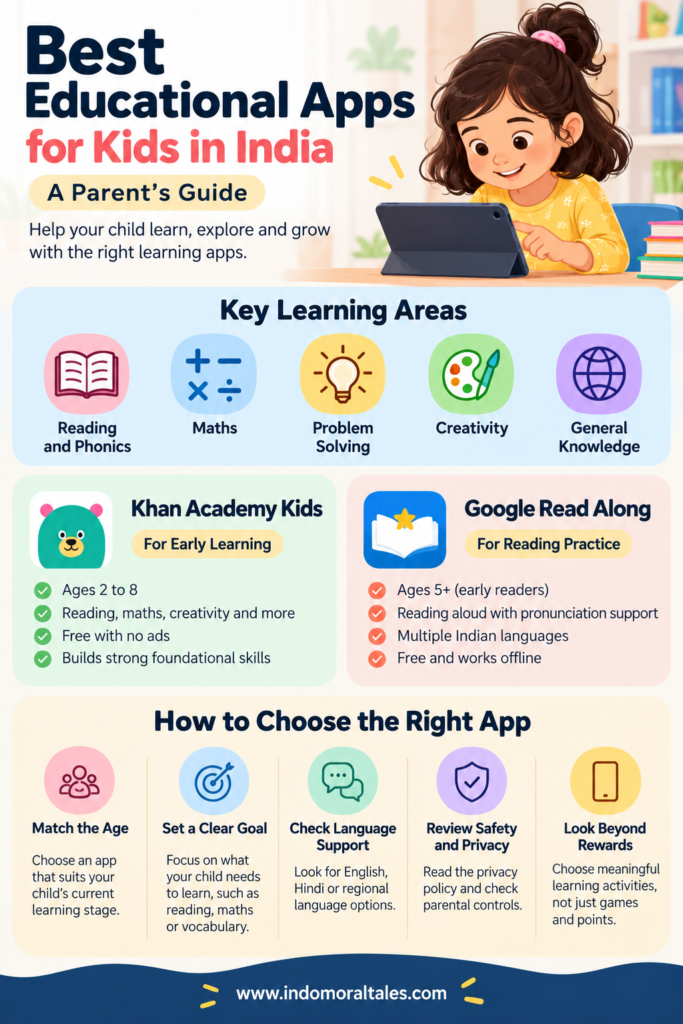
1. Khan Academy Kids: For Early Learning
Best for: Children aged 2 to 8 who are developing foundational literacy and numeracy skills.
Khan Academy Kids offers interactive activities covering reading, language, writing, maths, creativity and social-emotional learning. Its learning materials include books, videos, games and guided activities designed for young children.
The app is free and does not contain advertisements or subscription fees. Its broad subject coverage makes it an option for parents who want several early-learning activities within one platform.
Parents can explore it for letter recognition, early reading, counting and basic mathematical concepts. As with any learning app, children benefit from combining digital activities with conversations, physical play and reading with an adult.
2. Google Read Along: For Reading Practice
Best for: Children who are learning to read or practising reading aloud.
Google Read Along provides reading activities with a digital reading assistant that offers pronunciation support as children read aloud. It includes a library of stories and supports reading practice in multiple languages.
The mobile app is available free of charge, and its Android version is designed to work with limited connectivity and offline. Language availability and features can vary by version, so parents should check the current supported-language list before choosing it.
Read Along may be useful for children who need additional reading practice at home. It should complement, rather than replace, reading together with parents, teachers or other caregivers.
These descriptions reflect information published by the respective providers. Check current app features and availability before downloading.
How to Choose an Educational App for Your Child
A popular app is not automatically the right choice for every child. Evaluate these factors before installing one.
1. Match the App to Your Child’s Age
A preschooler learning letters needs a different experience from a child in primary school practising multiplication or reading comprehension.
Check the app’s recommended age range, reading requirements and difficulty level. Activities should offer an appropriate challenge without consistently frustrating the child.
2. Identify the Learning Objective
Start with a specific goal. Does your child need to recognise letters, practise phonics, improve reading fluency, learn number patterns or explore science?
Choose an app that supports that goal rather than one that simply offers a large collection of games.
3. Check Language Support
For families in India, language options can influence how useful an educational app is.
Some children may be learning in English while speaking another language at home. Others may benefit from practising Hindi or a regional language. Review the app’s supported languages and check whether instructions, stories and learning activities are available in the language your child needs.
4. Review Privacy and Parental Controls
Before creating an account, read the app’s privacy policy and check what information it collects. Review permissions, advertising practices, in-app purchases and options for managing a child’s account.
Prefer services that explain their data practices clearly and provide suitable controls for parents. Avoid sharing unnecessary personal information, photographs or location details.
5. Look Beyond Points and Rewards
Badges, characters and colourful animations can make activities engaging. However, entertainment alone does not establish educational value.
Look for meaningful practice, explanations, feedback and activities that gradually develop a skill. Observe whether your child can apply what they practise outside the app.
How Much Time Should Children Spend on Educational Apps?
There is no single screen-time allowance that suits every child, regardless of age, activity and circumstances. Parents should consider the child’s age, the purpose of the activity, overall daily screen use and whether screen time is affecting sleep, movement, play or family interaction.
For younger children, shared use is often more useful than handing over a device and leaving them to navigate independently. Ask questions about a story, count objects together or invite your child to explain a problem they have solved.
Balance digital learning with outdoor play, drawing, puzzles, physical books and everyday conversations. An educational app should support a child’s wider learning environment, not become its centre.
Are Free Educational Apps Good Enough?
Free educational apps can provide useful learning resources without requiring a paid subscription. For example, Khan Academy Kids and Google Read Along offer free learning experiences.
However, free access does not automatically guarantee that an app will meet every child’s needs. Review the content, language options, ease of use, privacy practices and relevance to the skills your child is developing.
Paid apps should be evaluated just as carefully. Before subscribing, check the total cost, renewal terms, cancellation process and whether the learning features justify the expense.
Frequently Asked Questions
Which educational app is best for kids in India?
The best option depends on the child’s age and learning goal. Khan Academy Kids offers early literacy, maths and other activities for children aged 2 to 8. Google Read Along focuses on reading practice and pronunciation support. Parents should compare features and language availability before deciding.
Are educational apps suitable for preschoolers?
Some apps are designed specifically for early learners. Choose age-appropriate activities, supervise their use and balance digital learning with play, conversation, movement and shared reading.
Can educational apps improve reading skills?
Apps can provide opportunities to practise letter recognition, phonics, vocabulary and reading aloud. Their usefulness depends on the quality of the activities, the child’s needs and how the app fits into a broader reading routine.
Should parents choose free or paid learning apps?
Start by identifying the learning objective and reviewing available free options. Consider a paid subscription only after checking its features, costs, privacy practices and suitability for your child.
Final Thoughts
Choosing educational apps for kids is less about downloading the most popular product and more about finding the right learning resource for a particular child.
Begin with one clear objective, review the app carefully and observe how your child responds. Used thoughtfully, digital learning can complement books, play, classroom teaching and everyday family activities.
The goal is not to increase screen time. It is to make the time children spend learning more purposeful.